


Krisp Review 2026: Is the AI Noise Cancellation & Meeting Assistant Still the Best?
Working remotely is fantastic, until your neighbor starts drilling, your dog starts barking, or a coffee grinder screams right in the middle of a high-stakes client call. While basic meeting tools have simple noise filters, they often struggle with sharp, sudden, or human-like noises.
Krisp.ai has long been the gold standard for audio isolation. Positioned as a virtual microphone layer between your physical hardware and your meeting app, it promises to filter out every unwanted sound—not just from your microphone, but also from incoming participants' speakers.
In 2026, Krisp has expanded beyond just noise cancellation to offer accent conversion and AI meeting notes. After putting Krisp through rigorous tests in noisy public settings, here is my hands-on evaluation.
1. Overview & Core Purpose
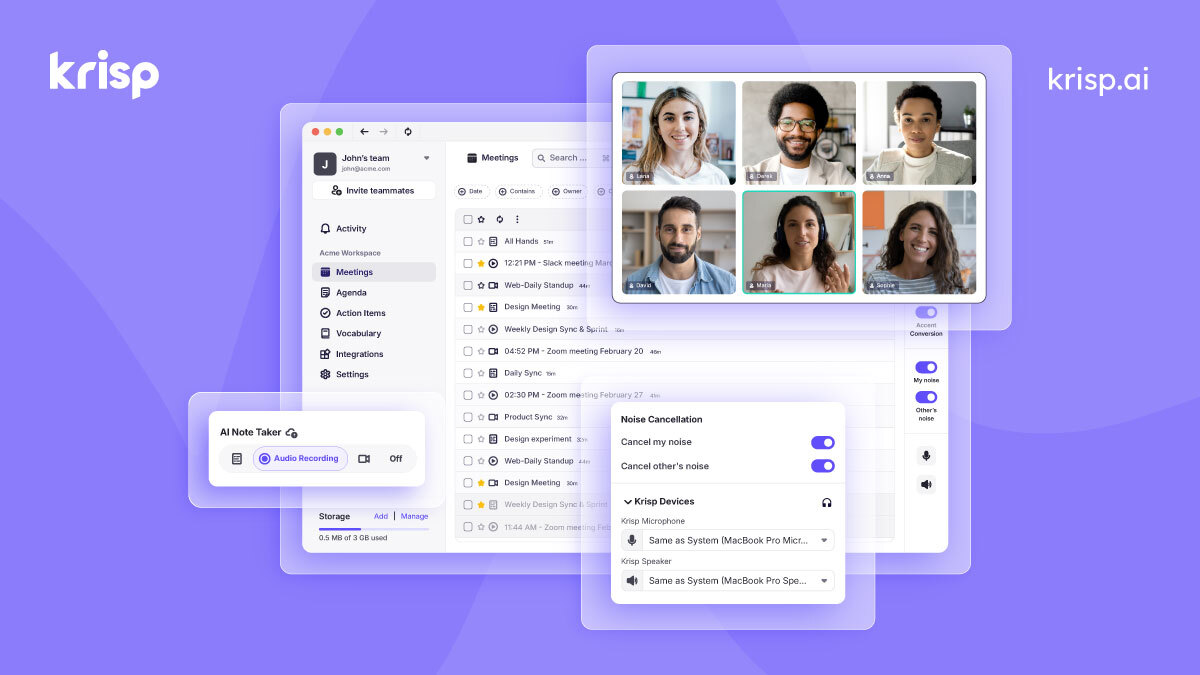
Krisp is a desktop application (for Windows and macOS) that sits silently in your system tray. Its core purpose is to clean up real-time audio streams. By setting your call app (Zoom, Google Meet, Slack, Discord, etc.) to use "Krisp Microphone" and "Krisp Speaker," all audio passes through Krisp's deep-learning AI model. It filters out background voices, sirens, keystrokes, and echoes, sending only a crystal-clear human voice through the line.
2. Key Features & Capabilities
- Two-Way AI Noise Cancellation: Most apps only filter your mic. Krisp cleans up both your microphone and the incoming audio from other participants, protecting you from their background noise.
- On-Device Processing: Unlike cloud-based tools, Krisp processes audio locally on your computer’s CPU/GPU. Your call data is never uploaded to the cloud for noise filtering, providing excellent compliance for GDPR, SOC2, and HIPAA.
- AI Meeting Assistant: Krisp automatically transcribes your calls in 16 languages, creating automated meeting summaries, action items, and syncing them directly to your CRM (Salesforce, HubSpot) or Slack.
- Accent Conversion (Beta): A pioneering feature targeted at global call centers, dynamically smoothing and adapting regional accents in real-time for clearer communication.
3. Usability & User Experience
Setting up Krisp takes less than two minutes. Once installed, it automatically detects when a call starts and displays a small pop-up controller. Toggling the noise cancellation on and off during my tests felt magical. In a noisy coffee shop with clinking cups and chatter, enabling Krisp instantly isolated my voice as if I were in an acoustic booth.
The only drawback is that on older laptops, the local AI processing can consume noticeable CPU resources, which might heat up your laptop or drain your battery slightly faster during long calls.
4. Head-to-Head Competitor Comparison
Here is how Krisp stacks up against other popular audio filters and meeting assistants.
| Category | Krisp | NVIDIA Broadcast | Otter.ai / Fireflies |
|---|---|---|---|
| Best For | Multi-platform Noise Cancellation + AI Notes | Windows Users with RTX GPUs | Pure Transcription & Note Taking |
| Compatibility | Windows & macOS (Any CPU) | Windows Only (Requires NVIDIA RTX GPU) | Web App / Integrates via Cloud Bot |
| Audio Processing | On-Device (100% Local) | On-Device (GPU accelerated) | Cloud-Based (Audio sent to servers) |
| Cost | Freemium (~$8/month billed annually) | 100% Free | Freemium (Starts at ~$10/month) |
| Key Advantage | ✅ Dual-way filtering & privacy | ✅ Free, includes video enhancements | 🥈 Advanced CRM search & automation |
5. Pricing & Value Proposition
Krisp offers a free plan with a limited daily allowance of noise cancellation minutes. The Pro plan starts at $8 per month (billed annually), which is highly competitive considering it includes both unlimited noise cancellation and the AI note-taker (which is cheaper than standalone meeting notetakers like Otter or Fireflies). For remote workers, consultants, and sales reps, the $8/month cost is an absolute bargain for professional-grade audio security.
6. Final Verdict & Rating Recommendation
If you already have a Windows machine with a powerful NVIDIA RTX card and only need noise cancellation, NVIDIA Broadcast is a fantastic free alternative.
But if you are on a Mac, use a standard Windows laptop, or want a tool that combines industry-leading noise isolation with automated meeting minutes and strict local data privacy, Krisp is still the undisputed champion. I give it a solid 9.2/10.
Our E-E-A-T Editorial Methodology & Standards
We personally test Krisp across real daily workloads for at least 30 days before publishing. We never accept sponsored bias.

Alex Tran (Lead Technology Editor)
✓ Verified Lead ReviewerProductivity systems architect with 6+ years testing 150+ SaaS tools. Maintains 100% editorial independence with zero sponsored bias.
Editor's Final Take: “If you frequently join online meetings or work in loud environments, Krisp is the undisputed leader in two-way AI noise and background voice cancellation.”